Blog

  • dotfiles

    Zhou Xianghui’s dotfiles using bspwm polybar

     ______                __  ___                   _           _
    |__  / |__   ___  _   _\ \/ (_) __ _ _ __   __ _| |__  _   _(_)
      / /| '_ \ / _ \| | | |\  /| |/ _` | '_ \ / _` | '_ \| | | | |
     / /_| | | | (_) | |_| |/  \| | (_| | | | | (_| | | | | |_| | |
    /____|_| |_|\___/ \__,_/_/\_\_|\__,_|_| |_|\__, |_| |_|\__,_|_|
                                               |___/
    
     ____        _    __ _ _
    |  _ \  ___ | |_ / _(_) | ___  ___
    | | | |/ _ \| __| |_| | |/ _ \/ __|
    | |_| | (_) | |_|  _| | |  __/\__ \
    |____/ \___/ \__|_| |_|_|\___||___/
    

    [Dependencies]

    • archlinux Arch Linux is an independently developed, x86-64 general-purpose GNU/Linux distribution that strives to provide the latest stable versions of most software by following a rolling-release model. The default installation is a minimal base system, configured by the user to only add what is purposely required.
    • GNU Stow The way you manage your dotfiles. A symlink farm manager which takes distinct packages of software and/or data located in separate directories on the filesystem, and makes them appear to be installed in the same place.
    • awesomewm awesome is a highly configurable, next generation framework window manager for X. It is very fast, extensible and licensed under the GNU GPLv2 license. It is primarily targeted at power users, developers and any people dealing with every day computing tasks and who want to have fine-grained control on their graphical environment.
    • Rofi A window switcher, application launcher and dmenu replacement.
    • picom A lightweight compositor for X11 (previously a compton fork)
    • doom-emacs Doom is a configuration framework for GNU Emacs tailored for Emacs bankruptcy veterans who want less framework in their frameworks, a modicum of stability (and reproducibility) from their package manager, and the performance of a hand rolled config (or better). It can be a foundation for your own config or a resource for Emacs enthusiasts to learn more about our favorite operating system.
    • ranger A VIM-inspired filemanager for the console.
    • zathura A highly customizable and functional document viewer. It provides a minimalistic and space saving interface as well as an easy usage that mainly focuses on keyboard interaction.
    • mpv A free (as in freedom) media player for the command line. It supports a wide variety of media file formats, audio and video codecs, and subtitle types.
    • termite A keyboard-centric VTE-based terminal, aimed at use within a window manager with tiling and/or tabbing support.
    • ydcv YouDao Console Version – Simple wrapper for Youdao online translate (Chinese <-> English) service API, as an alternative to the StarDict Console Version(sdcv).

    Intallation

    Make Sure You have Gnu Stow Installed

    stow -R 

    Screenshots

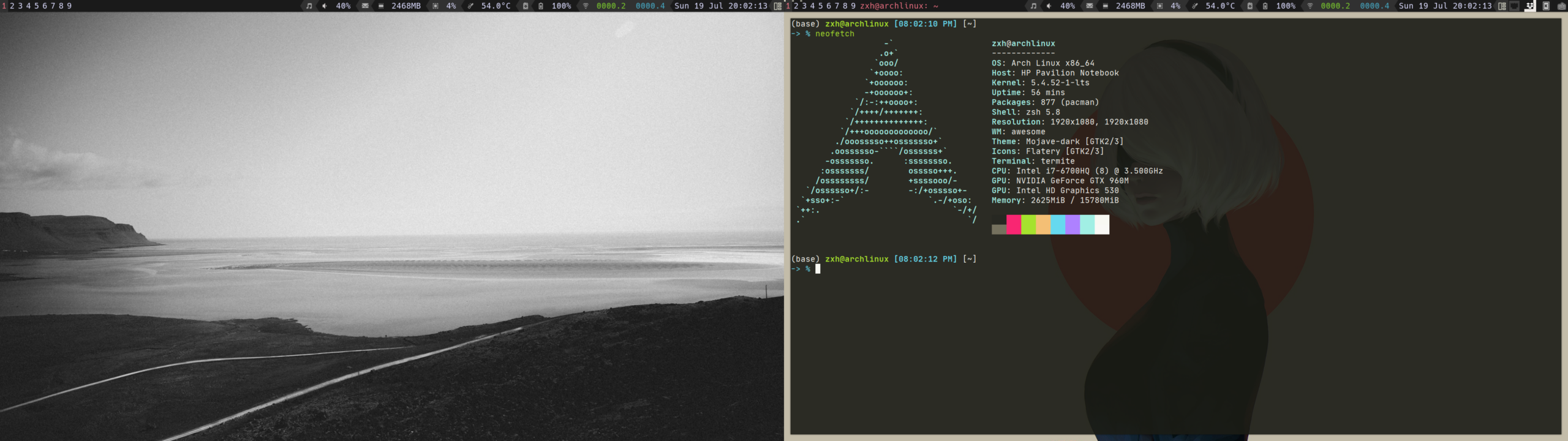
    • Desktop

    ./img/desktop.png

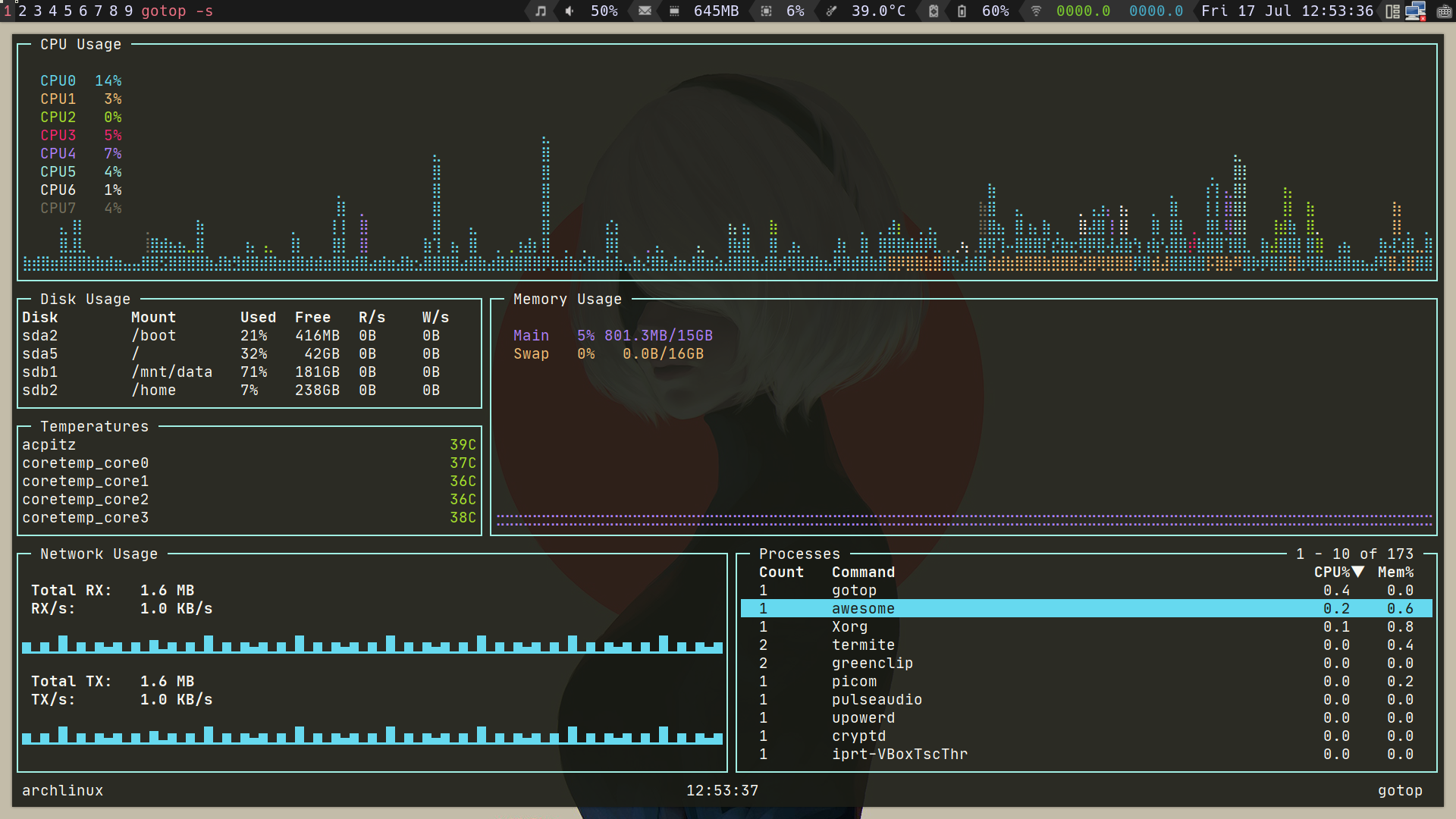
    • Gotop

    ./img/gotop.png

    • Mpv && Pulsemixer

    ./img/play-video.png

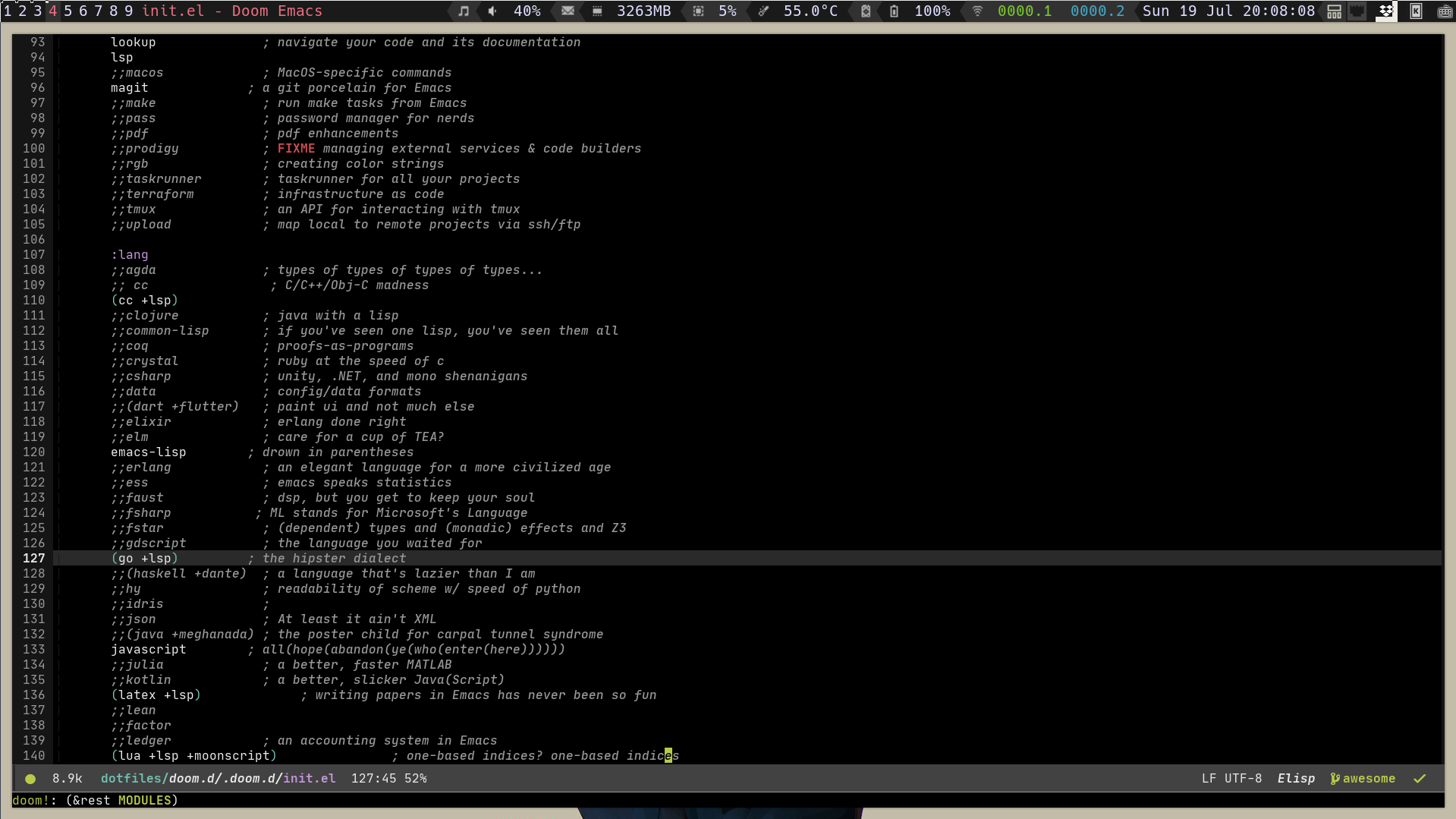
    • Doom Emacs

    ./img/doom-emacs.png

    • Ranger

    ./img/ranger.png

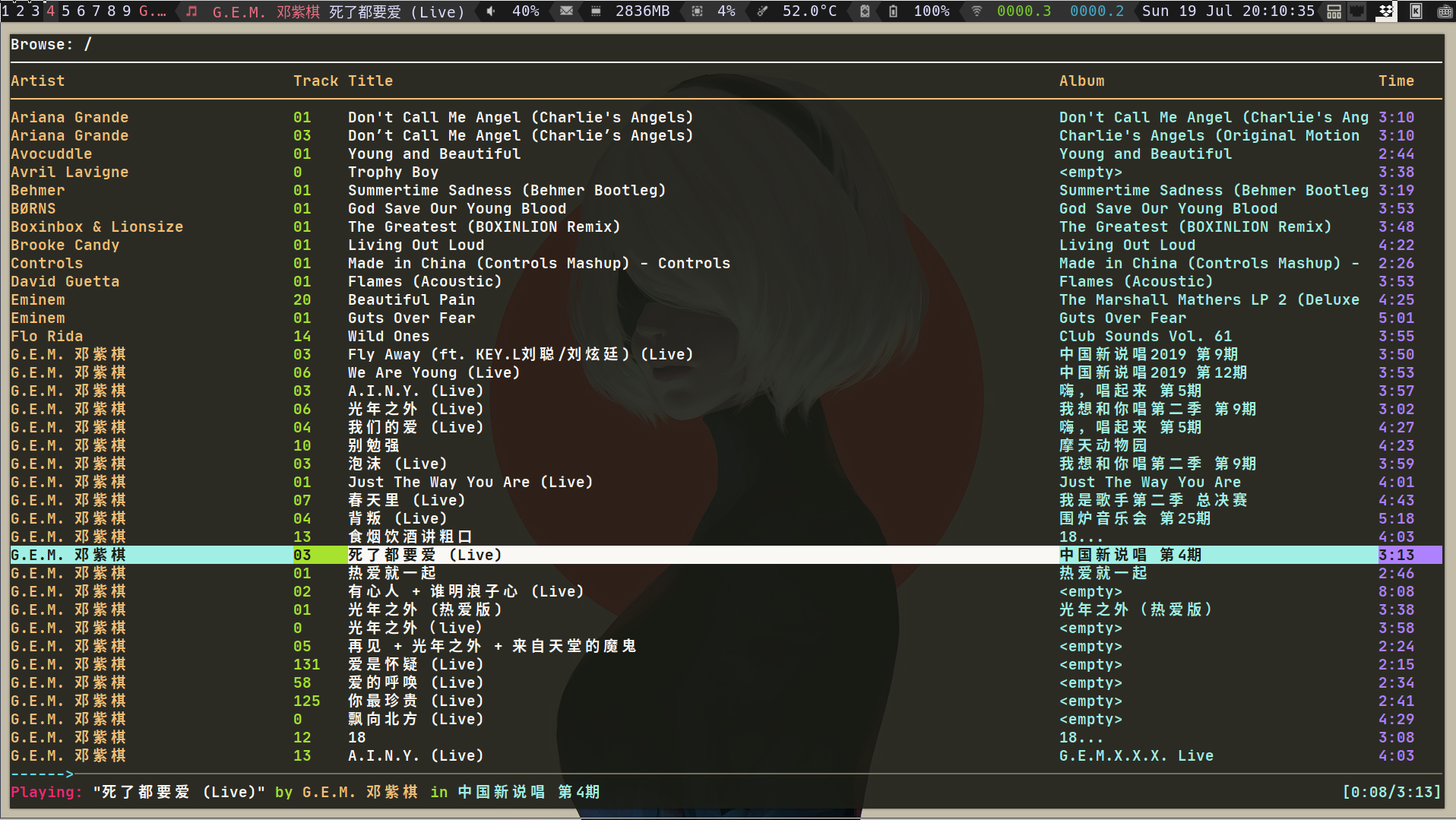
    • Music Player ncmpcpp

    ./img/ncmpcpp.png

    Visit original content creator repository
  • pillar-ui

    Pillar-ui Design System

    What is pillar-ui

    Pillar is a modern design system built with React, with the goal of providing a comprehensive set of reusable UI components that are fully accessible and adhere to best practices in modern web development.

    Features

    • Lightweight: Only 11KB. Built as a lightweight alternative with full support for RTL languages, TypeScript, dark mode, and customization at both global and component levels.
    • Accessibility: Fully compliant with WCAG 2.1 guidelines, including color contrast, high contrast mode, semantic markup, keyboard navigation, text resizing, and reduced-motion support.
    • Modularity: Each component is standalone and extensible, allowing for flexible usage in isolation or in combination for building complex UIs.
    • Consistency: Promotes a unified design language and consistent naming conventions for better usability and developer experience.
    • Flexibility: Offers variants and customization options while following best practices in CSS and JavaScript to reduce bundle size and boost runtime performance.
    • Responsive: Built with fluid design principles. Spacing, typography, and layout adapt seamlessly across screen sizes by default.
    • Theming: Powered by CSS variables, making it easy to create and apply custom themes that reflect any brand or application style.
    • Icon Component: Includes a fully customizable icon component with a rich set of prebuilt icons.
    • Hooks: Ships with helpful React hooks to simplify UI interactions like toggling menus and handling user input.
    • Usability: Designed with UX best practices to ensure a consistent, intuitive, and accessible experience for users.

    Installation

    Before You Install we need to let you know that pillar contain four packages (core, hooks,utils icons).

    # you can install all of them or only what you need
    
    #NPM
    npm i @pillar-ui/core
    # (or | and)
    npm i @pillar-ui/hooks
    # (or | and)
    npm i @pillar-ui/icons
    
    #Yarn
    yarn add @pillar-ui/core
    # (or | and)
    yarn add @pillar-ui/hooks
    # (or | and)
    yarn add @pillar-ui/icons

    How to use it

    import { Button, InputPassword, Input, Checkbox } from 'core'
    import { useBoolean } from 'hooks'
    import * as Icons from 'icons'
    
    function MyComponent() {
      const { state, handleToggle } = useBoolean()
    
      return (
        <form aria-label="Register page">
          <Input required name="name" autoComplete="name" label="Name" />
          <Input type="Email" required name="email" autoComplete="email" label="Email" />
          <InputPassword
            required
            autoComplete="new-password"
            label="password"
            hint="password must be between 6 to 30 character"
          />
          <Checkbox color="p" onChange={handleToggle} label="I agree to the terms and conditions" />
          <Button icon={<Icons.Send name="heart" size={24} color="d" />}>Register</Button>
        </form>
      )
    }

    Contributing

    We welcome contributions to Pillar-ui, whether that’s through reporting issues, submitting feature requests, or contributing code. For More Information Check CONTRIBUTING.md file

    Roadmap

    We are constantly working to improve Pillar-ui and add new features to the library. Our roadmap includes plans to improve accessibility, add new components, and improve the documentation. We welcome feedback and suggestions from the community and encourage you to get involved in the development process.

    Security Policy

    Please see our Security Policy for information on how to report security vulnerabilities and our disclosure policy.

    Sponsor Pillar-ui

    If you find Pillar-ui useful and want to support its development and maintenance, you can consider sponsoring the project. Your sponsorship will help cover the costs of development, testing, documentation, and community support. It will also help us allocate more time and resources to improving and expanding the library.

    You can sponsor the project on GitHub Sponsors. GitHub Sponsors is a platform that enables you to support open source projects and contributors. You can choose to sponsor us monthly or with a one-time donation. Your sponsorship will be publicly recognized on our GitHub repository and website.

    Alternatively, you can also support the project by contributing code, reporting issues, and spreading the word about it. Every little bit helps and we appreciate all contributions, big and small.

    ko-fi

    Thank you for considering sponsoring Pillar-ui!

    License

    Pillar-ui is released under the MIT License.

    Visit original content creator repository

  • rPPG-heart-rate-estimation-deep-learning-method

    rPPG BASED HEART RATE ESTIMATION USING DEEP LEARNING

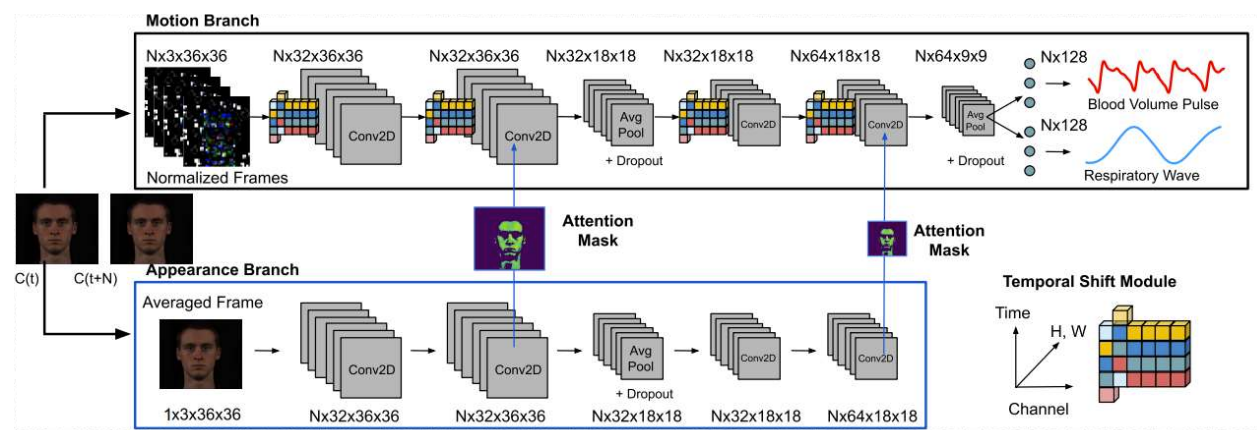
    In this project, we used MTTS-CAN toolbox for implementations of deep based methods.

    ABSTRACT

    Remote heart rate estimation is the measurement of heart rate without any physical contact with the patients. This is accomplished using remote photoplethysmography (rPPG). rPPG signals are usually collected using a video camera with a limitation of being sensitive to multiple contributing factors, such as different skin tones, lighting condition of environment and facial structure. There are multiple studies and generally two basic approaches in the literature to process and make sense of these signals: Firstly, we examined the traditional methods as CHROM DEHAN [1], ICA POH [2], GREEN VERCRUYSSE [3] and POS WANG [4]. Secondly, we examined MTTS-CAN [5], one of the deep learning methods. While we tried traditional methods with the UBFC [6] dataset, we ran deep learning methods with UBFC and PURE [7] datasets. When we used SNR [8] to calculate heart rate based on the Blood Volume Pulse (BVM) signal resulting from deep learning-based methods, we observed a significant improvement in some results. In summary, we concluded that deep learning-based methods play an important role in the development of rPPG technologies and their introduction into our daily lives.

    METHOD

    We planned to carry out our measurements with deep learning methods, which was our main approach. We hoped that deep learning reduced error rates as a result of these measurements. We used the model of MTTS-CAN to obtain the heart rate signals. This method processes RGB values captured by cameras with functions that also contain certain calculations for various external factors. These external factors include non-physiological variations such as the flickering of the light source, head rotation, and facial expressions. In this method, there are Temporal Shift Modules that will facilitate the exchange of information between frames. These modules provide superior performance in both latency and accuracy. MTTS-CAN also calculates the respiratory rate along with the heartbeat. Since respiration and pulse frequencies cause head and chest movements of the body, calculating these two values together had a great impact on the accuracy of the values compared to independently calculated models. [5]

    ARCHITECTURE

    Flowchart of the proposed algorithm

    RESULTS

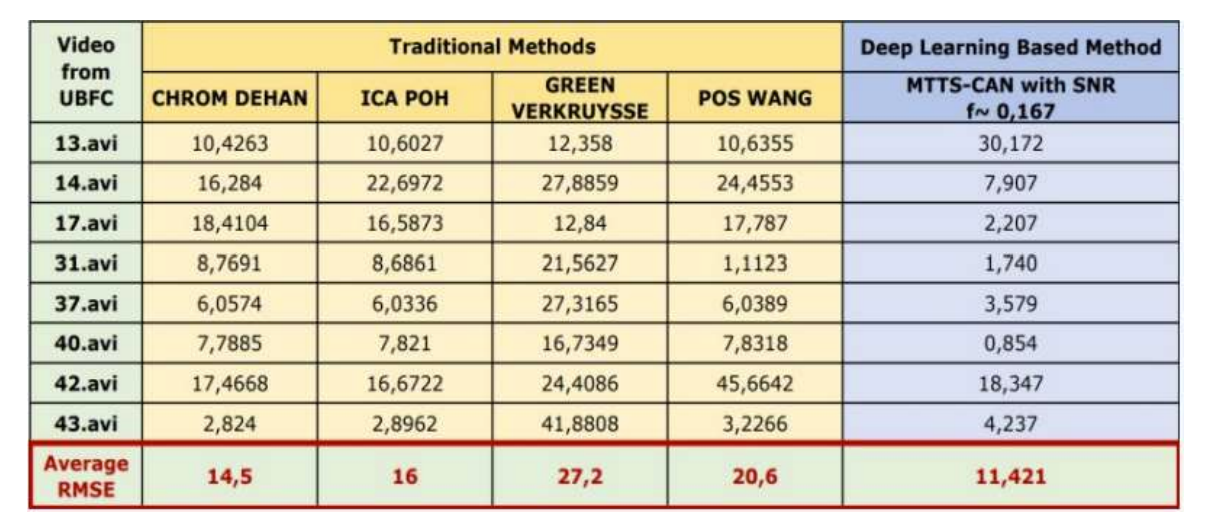
    In the table, we could see the results of traditional methods which are CHROM DEHAN, ICA POH, GREEN VERCRUYSSE and POS WANG methods. In a deep learning-based method which is MTTS-CAN. For example, if we look at 17.avi for all methods, we calculated that deep learning has dropped below five. This result is quite good for us. When we look at the average RMSE values of these methods, we see that the deep learning-based method gives the best results because it has the lowest RMSE.

    CONCLUSION AND FUTURE WORK

    We worked with the traditional methods in the first term and worked with deep-based methods in the second term. According to the information from literature studies and our studies throughout the year, we can say that deep learning-based methods generally give more correct and faster results than traditional methods. In addition, when we used SNR to calculate heart rate based on the Blood Volume Pulse (BVP) signal resulting from deep learning-based methods, we observed a significant improvement in some results. As a result, we can say that deep learning-based methods play an important role in the development of rPPG technologies and their introduction into our daily lives. In the pandemic period, telehealth and remote health monitoring have become increasingly important and people widely expect that this will have a permanent effect on healthcare systems. These tools can help reduce the risk of discovering patients and medical staff to infection, make healthcare services more reachable, and allow doctors to see more patients. In this context, we believe that it will find a place both in health centres and in all kinds of electronic devices. As we can see from the technology news that comes out every day, leading universities of education and leading companies in technology have also concentrated on rPPG studies and both contribute to the literature with research to solve the problems in rPPG or develop new methods. In the next few years, it seems quite possible to open the front camera of our mobile phone and measure our heart rate while sitting at home. Of course, there is no limit to the number of applications to which this technology will be integrated.


    The project is developed by

    Supervised by Prof. Dr. Çiğdem EROĞLU ERDEM

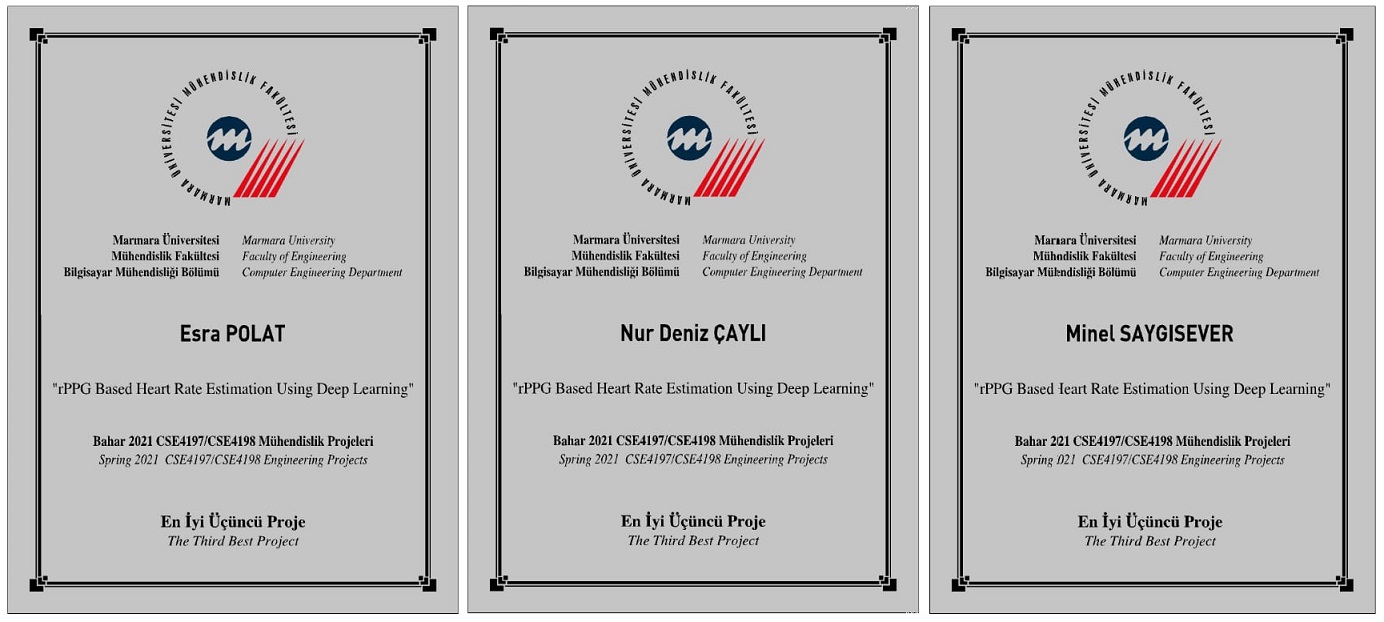
    And this project was awarded the third best project. You can find all the details in our thesis.

    You can go to the first phase of the project from this link.


    [1] De Haan, G., & Jeanne, V. (2013). Robust pulse rate from chrominance-based rPPG. IEEE Transactions on Biomedical Engineering, 60(10), 2878-2886
    [2] Poh, M. Z., McDuff, D. J., & Picard, R. W. (2010) Non-contact, automated cardiac pulse measurements using video imaging and blind source separation. Optics express, 18(10), 10762-10774
    [3] Vercruysse, W., Svasand, L. O., & Nelson, J. S. (2008). Remote plethysmographic imaging using ambient light. Optics express, 16(26), 21434-21445.
    [4] W. Wang, A. C. den Brinker, S. Stuijk, and G. de Haan, “Algorithmic principles of remote ppg,” IEEE Transactions on Biomedical Engineering, vol. 64, no. 7, pp. 1479–1491, 2016
    [5] Xin Liu, Josh Fromm, Shwetak Patel, Daniel McDuff, “Multi-Task Temporal Shift Attention Networks for On-Device Contactless Vitals Measurement”, NeurIPS 2020, Oral Presentation (105 out of 9454 submissions)
    [6] S. Bobbia, R. Macwan, Y. Benezeth, A. Mansouri, J. Dubois, (2017), Unsupervised skin tissue segmentation for remote photoplethysmography, Pattern Recognition Letters
    [7] Stricker, R., Müller, S., Gross, H.-M. “Non-contact Video-based Pulse Rate Measurement on a Mobile Service Robot” in Proc. 23st IEEE Int. Symposium on Robot and Human Interactive Communication (Ro-Man 2014), Edinburgh, Scotland, UK, pp. 1056 – 1062, IEEE 2014
    [8] Remote Photoplethysmography Using Nonlinear Mode Decomposition, Halil Demirezen, Cigdem Eroglu Erdem Marmara University Department of Computer Engineering, Goztepe, Istanbul, Turkey, pp. 1060– 1064, 2018.

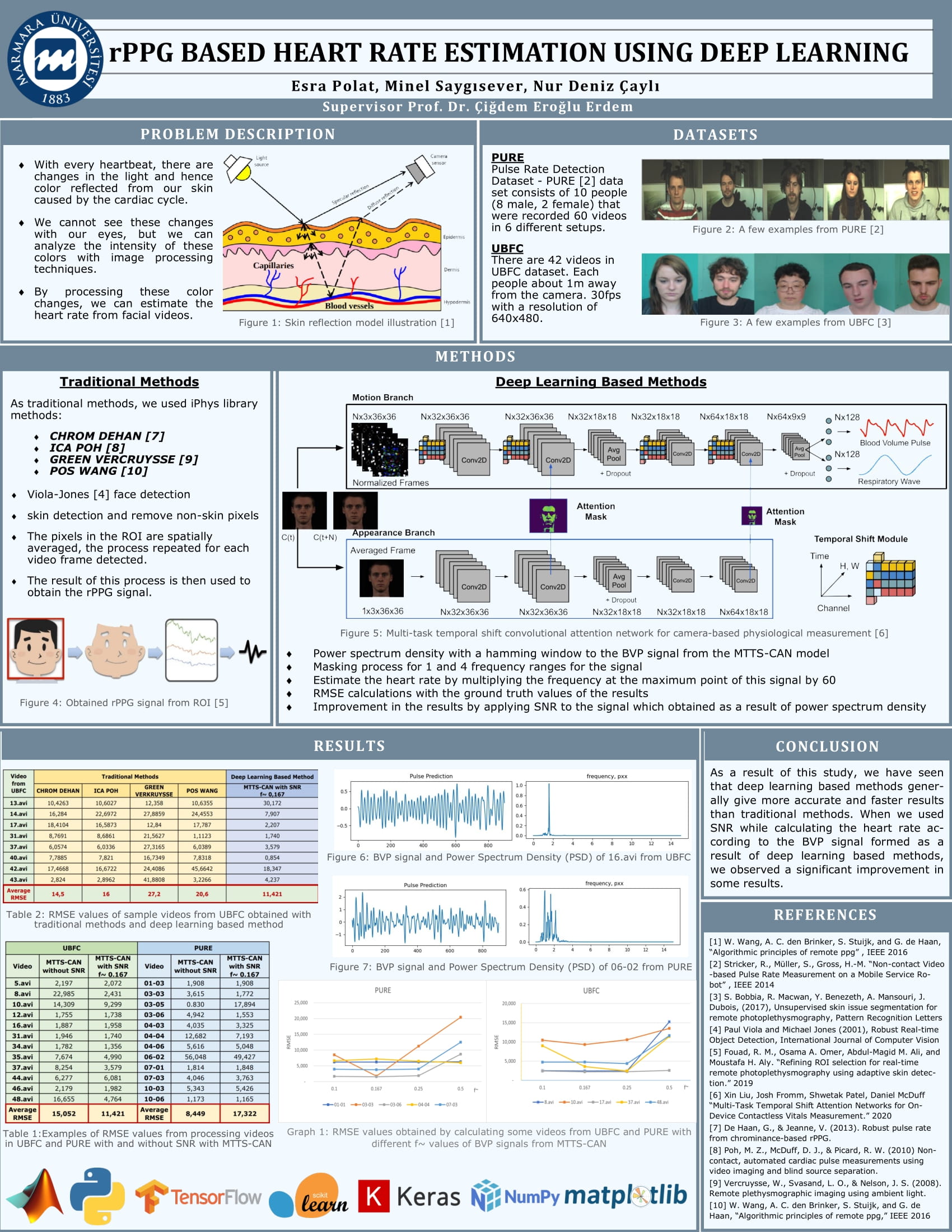
    POSTER

    Visit original content creator repository
  • multicounter

    MultiCounter

    A simple, elegant counter with support for counting multiple things at once.

    Joseph Hale's software engineering blog

    Installation

    Pip

    pip install multicounter

    Poetry

    poetry add multicounter

    Usage

    from multicounter import MultiCounter
    mc = MultiCounter()
    
    # Choose a name for your counter and start counting!
    mc.foo += 1
    
    # You can choose an initial value for a counter ...
    mc.bar = 42
    # ... and increment or decrement it however you like.
    mc.bar -= 4
    
    print(mc.get_counters())
    # {'foo': 1, 'bar': 38}

    Contributing

    See CONTRIBUTING.md

    The Legal Stuff

    `MultiCounter` by Joseph Hale is licensed under the terms of the Mozilla
    Public License, v 2.0, which are available at https://mozilla.org/MPL/2.0/.
    
    You can download the source code for `MultiCounter` for free from
    https://github.com/jhale1805/multicounter.
    

    TL;DR

    You can use files from this project in both open source and proprietary applications, provided you include the above attribution. However, if you modify any code in this project, or copy blocks of it into your own code, you must publicly share the resulting files (note, not your whole program) under the MPL-2.0. The best way to do this is via a Pull Request back into this project.

    If you have any other questions, you may also find Mozilla’s official FAQ for the MPL-2.0 license insightful.

    If you dislike this license, you can contact me about negotiating a paid contract with different terms.

    Disclaimer: This TL;DR is just a summary. All legal questions regarding usage of this project must be handled according to the official terms specified in the LICENSE file.

    Why the MPL-2.0 license?

    I believe that an open-source software license should ensure that code can be used everywhere.

    Strict copyleft licenses, like the GPL family of licenses, fail to fulfill that vision because they only permit code to be used in other GPL-licensed projects. Permissive licenses, like the MIT and Apache licenses, allow code to be used everywhere but fail to prevent proprietary or GPL-licensed projects from limiting access to any improvements they make.

    In contrast, the MPL-2.0 license allows code to be used in any software project, while ensuring that any improvements remain available for everyone.

    Visit original content creator repository
  • SoundRecorder

    SoundRecorder

    Some web applications require an MP3 recorder to record sound directly from the user. The sound is converted to mono MP3 format with an adjustable sample rate and bit rate to reduce the output file size.

    A page can contain several MP3 recorders that can be used interchangeably. The recording process can be paused and can be resumed to continue the recording process.

    Reqirement

    1. Lame
    2. jQuery 1.11.1

    Example

    <html>
    <head>
        <title>MP3 Recorder</title>
        <meta name="viewport" content="width=device-width, minimum-scale=1.0, maximum-scale=1.0, user-scalable=no">
        <link rel="stylesheet" type="text/css" href="css/css.css">
        <script type="text/javascript" src="https://cdnjs.cloudflare.com/ajax/libs/jquery/1.11.1/jquery.min.js"></script>
        <script type="text/javascript" src="js/lame.js"></script>
    	<script type="text/javascript" src="js/js.js"></script>
    </head>
    
    <body>
    <style type="text/css">
    .audio-tool-wrapper {
    	display:flex;
    	justify-content:center;
    }
    
    .audio-tool-wrapper > span {
    	width:100px;
    	margin:8px;
    	text-align:center;
    	position:relative;
    	display:block;
    }
    </style>
    
    <h1>MP3 Recorder</h1>
    	<div class="audio-recorder" data-question-id="12" data-audio-index="1">
        	<div class="audio-tool-wrapper">
            	<span><a class="audio-tool tool-browse" title="Pilih File Suara"><span></span></a></span>
            	<span><a class="audio-tool tool-record" title="Rekam Langsung"><span></span></a></span>
            	<span><a class="audio-tool tool-play" title="Dengarkan"><span></span></a></span>
            	<span><a class="audio-tool tool-stop" title="Hentikan"><span></span></a></span>
            	<span><a class="audio-tool tool-upload" title="Unggah Suara"><span></span></a></span>
            	<span><a class="audio-tool tool-download" title="Unduh Suara"><span></span></a></span>
            	<span><a class="audio-tool tool-delete" title="Hapus Suara"><span></span></a></span>
                <span><span class="tool-timer"><i></i></span></span>
            </div>
        </div>
    	<div class="audio-recorder" data-question-id="12" data-audio-index="2">
        	<div class="audio-tool-wrapper">
            	<span><a class="audio-tool tool-browse"><span></span></a></span>
            	<span><a class="audio-tool tool-record"><span></span></a></span>
            	<span><a class="audio-tool tool-play"><span></span></a></span>
            	<span><a class="audio-tool tool-stop"><span></span></a></span>
            	<span><a class="audio-tool tool-upload"><span></span></a></span>
            	<span><a class="audio-tool tool-download"><span></span></a></span>
            	<span><a class="audio-tool tool-delete"><span></span></a></span>
                <span><span class="tool-timer"><i></i></span></span>
            </div>
        </div>
    <script type="text/javascript">
    
    var audioRecorder = {
    	initialized:false,
    	recorder:[]
    };
    var params = {
    	bitrate:32,
    	sampleRate:44100,
    	timeLimit:1800,
    	uploadSound:function(audio, duration, index, questionID, audioIndex){
    		console.log(audio.src);
    		audioRecorder.recorder[index].beforeUpload();
    		setTimeout(function(){
    			audioRecorder.recorder[index].afterUpload();
    		}, 2000);
    		var url = audio.src;
    		$.ajax({
    			url:'upload-sound.php',
    			type:'POST',
    			dataType:"json",
    			data:{
    				sound_data:url,
    				question_id:questionID,
    				audio_index:audioIndex
    			},
    			success: function(data)
    			{
    				console.log('Uploaded');
    			}
    		});     
    	},
    	downloadSound:function(audio, duration, index, questionID, audioIndex)
    	{
    		console.log(audio.src);
    
    		//Create a URL to the blob.
    		/*
    		var url = window.URL.createObjectURL(blob);
    		window.open(url);
    		*/
    
    	},
    	nullAudio:function()
    	{
    		alert('Belum ada audio cuyy! Selesaikan rekaman dulu...');
    	},
    	stillRecording:function()
    	{
    		alert('Masih merekam cuyy! Selesaikan dulu yach...');
    	},
    	stillPlaying:function()
    	{
    		alert('Masih memutar cuyy! Ga boleh merekam dulu... Pause dulu kek, atau tunggu selesai...');
    	},
    	overLimit:function()
    	{
    		alert('Melebihi batas');
    	},
    	log:function(text)
    	{
    		console.log(text);
    	}
    };
    
    $(document).ready(function(e) {
    
    	$(document).on('click', '.audio-recorder .tool-browse', function(e)
    	{
    		var audioController = $(this).closest('.audio-recorder');
    		var idx = audioController.attr("data-index") || "";
    		if(idx == "")
    		{
    			var index = audioRecorder.recorder.length;
    			audioRecorder.recorder.push(new MP3Recorder(audioController, index, 'browse', params));
    		}
    		
    	});
    	
    	$(document).on('click', '.audio-recorder .tool-record', function(e)
    	{		
    		var audioController = $(this).closest('.audio-recorder');
    		var idx = audioController.attr("data-index") || "";
    		if(idx == "")
    		{
    			var index = audioRecorder.recorder.length;
    			audioRecorder.recorder.push(new MP3Recorder(audioController, index, 'record', params));
    		}
    	})	
    });
    
    </script>
    </body>
    </html>
    

    Visit original content creator repository

  • ESP32FileuploadServer

    ESP32 Local Webserver

    with SPIFFS Upload & MCP4725 Digital to Analog Transmission Routine

    Overview

    This repository contains a web application for ESP32 that enables users to upload, delete, download, and format files. Additionally, it includes a routine to transmit data from a medical dataset uploaded on the SPIFFS using an MCP4725 DAC peripheral.

    Screenshots

    Screenshot1 Screenshot2

    Structure

    1. The final deployed application can be found under V3/.
    2. Web application files (HTML/CSS/JS) are stored as a .h file under include/.
    3. The webserver and DAC routine application are located in src/.
    4. The maximum possible partition table for a 6MB ESP32 V2 is provided in no_ota_2_2.csv.
    5. PlatformIO configuration files for featheresp32 and adafruit_feather_esp32_v2 are available in platformio.ini.

    Tips if forking for your project

    1. There seems to be a limit to the amount of CSS that can be rendered at runtime when supplied using inline <style>. If your application requires elaborate CSS and/or frameworks, it’s recommended to load the files onto SPIFFS and reference them in your HTML.
    2. Since this project necessitated SPIFFS formatting capability, the HTML, CSS, and JS files are stored in app storage as header files. If this isn’t an issue for your project, it’s better to have separate .html, .css, and .js files in SPIFFS.
    3. The app will be served at http://"your-hostname". By default –> retia_cp200. Refer V3/retia.ino for complete wifi config details.
    4. The app also has an API through which you can access the app via serial. You can test it using Docklight etc.
    5. V5/ is a “serial” version of the app, without the web app capabilites. Think of it as a glorified DAC system hooked onto your PC. It has an API that can be used to transmit files directly via serial. Using com_script.py, you can trasmit your local file. The script allows you to change your COM port, file location etc. The idea behind this implementation is that now you have no limit on file that has to be trasmitted, as the file will be on your PC and not SPIFFS. Note: The script is configured to scale down DAC’s reference voltage of 3.3V to 3.0V. (See V5/retia.ino)

    Acknowledgement

    Parts of the SPIFFS upload mechanism are based on this repository.

    Visit original content creator repository
  • 21sh

    21sh

    Project from UNIX branch in school 42

    Project 21sh is the continuation of the project minishell

    New in 21sh project

    Mandatory implementations

    [✓] Pipes ‘|

    [✓] The 4 following redirections ‘<‘, ‘>‘, ‘<<‘ and ‘>>

    [✓] File descriptor aggregation ‘<&‘ and ‘>&

    [✓] Basic line editing features using termcap library

    Bonuses

    [✓] Implementation of Hash Table for binary files, also the hash builtin command

    [✓] Advanced auto completion using tab

    [✓] Search through history using ctrl+R

    [✓] Some other line editing features (see below)

    Hotkey list for line editing:

    Key Details
    Left move cursor backward by one character
    Right move cursor forward by one character
    Up List term history up
    Down List term history down
    Ctrl + Left ⌃← move cursor backward by one word
    Ctrl + Right ⌃→ move cursor forward by one word
    Ctrl + Up ⌃↑ move cursor backward by one row
    Ctrl + Down ⌃↓ move cursor forward by one row
    Ctrl + Shift + Left ⌃⇧← delete the word in front of the cursor
    Ctrl + Shift + Right ⌃⇧→ delete the word after the cursor
    Ctrl + Shift + Up ⌃⇧↑ delete the row in front of the cursor
    Ctrl + Shift + Down ⌃⇧↓ delete the row after the cursor
    Return Confirm line entry
    Backspace delete one previous character from current position of cursor
    Delete delete one character from current position of cursor
    Home move cursor to the beginning of the line
    End move cursor to the end of the line
    Tab Auto compilation
    Ctrl + R ⌃R Search history
    Ctrl + A ⌃A work same as Home
    Ctrl + E ⌃E work same as End
    Ctrl + U ⌃U clear all characters in front the cursor
    Ctrl + K ⌃K clear all characters after the cursor
    Ctrl + G ⌃G clear all characters in line
    Ctrl + H ⌃H Undo the last change
    Ctrl + L ⌃L clear screen

    Preview

    Preview output

    ➜  21sh git:(master) ./21sh
    ✓ (21sh) cd /tmp/test_dir/
    ✓ (test_dir) pwd
    /tmp/test_dir
    ✓ (test_dir) env
    TERM_SESSION_ID=w0t0p0:D3D7901C-F606-4245-89ED-C2B1F3E713F3
    SSH_AUTH_SOCK=/private/tmp/com.apple.launchd.ldiuufG508/Listeners
    LC_TERMINAL_VERSION=3.3.6
    Apple_PubSub_Socket_Render=/private/tmp/com.apple.launchd.lcd6sflWma/Render
    COLORFGBG=7;0
    ITERM_PROFILE=Default
    XPC_FLAGS=0x0
    PWD=/tmp/test_dir
    SHELL=21sh
    LC_CTYPE=UTF-8
    TERM_PROGRAM_VERSION=3.3.6
    TERM_PROGRAM=iTerm.app
    PATH=/usr/local/bin:/usr/bin:/bin:/usr/sbin:/sbin:/usr/local/mysql/bin
    LC_TERMINAL=iTerm2
    COLORTERM=truecolor
    TERM=xterm-256color
    HOME=/Users/prippa
    TMPDIR=/var/folders/nc/lc4x38yx18sgjmwh0qyy9prw0000gn/T/
    USER=prippa
    XPC_SERVICE_NAME=0
    LOGNAME=prippa
    ITERM_SESSION_ID=w0t0p0:D3D7901C-F606-4245-89ED-C2B1F3E713F3
    __CF_USER_TEXT_ENCODING=0x0:7:49
    SHLVL=2
    OLDPWD=/Users/prippa/Desktop/21sh
    LC_ALL=en_US.UTF-8
    LANG=en_US.UTF-8
    ZSH=/Users/prippa/.oh-my-zsh
    PAGER=less
    LESS=-R
    LSCOLORS=Gxfxcxdxbxegedabagacad
    _=env
    ✓ (test_dir) touch riri
    ✓ (test_dir) ls
    riri
    ✓ (test_dir) rm riri ;cat riri 2>&-
    ✕ (test_dir) cat riri
    cat: riri: No such file or directory
    ✕ (test_dir) mkdir test; cd test; ls -a; ls | cat | wc -c > fifi; cat fifi
    .	..
           5
    ✓ (test) pwd
    /tmp/test_dir/test
    ✓ (test) echo '
    quote> Hello
    quote> World
    quote> !
    quote> '; echo "awesome $SHELL";\
    > exit
    
    Hello
    World
    !
    
    awesome 21sh
    exit
    ➜  21sh git:(master)
    

    more info

    Visit original content creator repository

  • MameRomCheck

    [ updated 1st of March 2020 ]

    MameRomCheck

    yet another tool to manage Mame Roms – ui and api

    it has a gui (tkinter or gtk) and an api. This is very early release, but non destructive,
    since it only get informations and dont touch anything (for now..)

    Goal is to Provide a ‘simple’ user interface and a python api to get efficient romset listing inside Mame
    without weeks of self-education about how Mame work :

    • check wether a rom is really playable (not only marked as working)
    • check several romsets against several releases of Mame
    • remove duplicates, move roms in the right place
    • integrate into existing mame tools eco-system
    • click on a romset and run the compatible Mame release.

    Goal is not to compete with very powerful analysis tools like clrMamePro or romCenter.
    But both needs a lot of self eductation about how Mame work, and so far I was not able to automatically check wether a romset
    is really playable or not / to only keep the playable romsets in my roms directories.

    environment(s) :

    • Windows 10 for now

    for GTK interface :

    • python3.8.2 from mingw64
    • the GTK library

    for TKinter interface :

    • python3.7+ for windows from python.org
    • PIL (pip install pillow)

    this should work in other context, provided you use a Python 3.7+ release, but didn’t get the chance to test yet.

    installation :

    • unzip master and open a cmd shell.
    • it needs 3 files from the 7-zip project to run : these can be found in the 7zip 19.00 64-bit x64 version, on the 7-zip.org website :
      https://www.7-zip.org/download.html. direct download link
    • the 7z1900-x64.exe can be open as an archive with 7zip to get the files
    • If you didnt have 7-zip then you should :). Install it (and uninstall winrar, winzip etc once confident).
    • copy 7z.exe, 7z.dll and License.txt from in the ./bin directory
    • cd to the top level of the directory then :
    python bin
    

    The GTK user interface will open

    python bin/tk.py
    

    The tkinter user interface will open. Please note I work first on the GTK ui for now, (2020/03/01)
    so everything wont work as it should with tkinter.

    add Mame installations

    • click the add button under the Mame releases area and browse to your Mame64.exe runtime,
    • the guess release button should populate the name and version field (Version field is important you should let it as is)
    • click ok : the Mame release is added. in the Romset folders view, the roms folder(s) defined in mame.ini should appear.
    • the ‘M’ icon means the corresponding folder is used by the currently selected Mame release. Try to add another Mame release to get it.
    • one can add additional romset folders which are not used by any Mame installation
    • name and/or path MUST be different for Mame and folders, no duplicates.

    list romsets

    • click on a romset folder to see what it contains
    • in the romsets view, click on a romset to populate some information. This makes use of the 7z.exe and dll files.
    • the update button refresh the romset list if needed.
    • the verify button test the romset with the currently selected Mame release.
    • the verify all button test all the romsets of the current folder with the currently selected Mame release. this is multithreaded but this is uncompiled python code : is takes around 25 seconds for 800 romsets on a i7.
    • use the save button to save the informations gathered.

    run

    • a romset will be ok if the driver is reported as ‘good’ in the romset view/driver column (but this need a couple more tests to be sure [bios tests, split romset etc…])
    • try the ‘Run with Mame xxx’ button

    API

    Actually the core code is apart from the interface so on could script operations or integrate in another python project.

    to run and play from a python console :

    python -i bin/mameromcheck.py
    

    the ui’s make use of the methods listed below, so can you.

    Mame.list()         # list your Mame Releases (ordered as in the conf.default.tab file and the ui)
    Romdir.list()       # list your romset folders (ordered as in the conf.default.tab file and the ui)
    m = Mame.get(0)     # get the first Mame installation you defined. Mame.get(name) also work.
    m2 = Mame("C:\\ ... \\mame64.exe")  # create a new mame installation
    m2.name = 'my Mame'                 # add a name if you want to save it later
    
    m.run()             # run Mame
    rd = Romdir.get(1)  # get the second romset folder you defined. with name also.
    rd.romset.keys()    # romsets names in this folder
    rd.populate()       # update the romset of this folder
    rd.verify(0)        # silently run a -listxml Mame command on 
    r = rd.romset['romsetname']  # get a romset
    r.verify(0)         # verify it with the first Mame installation
    m.activate()        # romsets will return verification results of the first Mame release ( since m = Mame.get(0) )
    r.driver            # if 'good' is returned, then this should be ok for this release
    
    r.verify(1)            # verify it with the second Mame installation
    Mame.get(1).activate() # romsets will return verification results of the second installation
    r.driver               # so this could be a different result than previously
    r.run(0)               # run the romset with the first Mame release
    r.description
    r.roms              # dictionnary with rom information (crc)
    ...
    
    task.info()     # infos about parrallel threads and current tasks
    task.maxtasks   # max number of parrallel threads. used by ROmdir.verify(), default 5, use with caution (10 means 40% cpu on a i7 8gen. and is ok for me)
    task.verbose    # True|False
    ...
    
    cfg.save()      # save everything in conf/default.tab. file is human readable
    
    [! WIP WIP WIP !]

    Visit original content creator repository